
Everything the counter, the waiters and the owner need
Restaurant billing and POS software for restaurants, cafés and bars across India, grouped the way the product is organised. Nothing here is a mock-up of a plan — it is what ships today.
Built around occupied tables, not tickets
A table has one live order. Add a dish and the order exists. No KOT juggling, no lost tickets.
Live floor on every screen
Running, bill-requested and billed tables update instantly on the counter and every phone over SignalR — with 30-second polling as the safety net.
Sections and table numbers
Group tables under floor sections (AC hall, terrace, bar) exactly as your restaurant is laid out. Sections are assigned in Admin → Tables.
Type the dish code, press Enter
Cashiers keep their muscle memory — legacy item codes like 3, 166 or 1521 add a dish in one keystroke. Same item, same note merges into one line.
Popular items first
The top 24 dishes by quantity sold in the last 30 days appear as the first category, on the counter and on phones.
Void, never delete
Lines are voided with a permission (orders.void), never removed — so what happened at a table stays visible.
Bill requests with a chime
A waiter taps Request bill; every counter user gets a two-note chime and a toast that opens the bill page.
Move a dish, or part of it, to another table
Guests change tables, or a plate went on the wrong one. Move the whole line, or just two of its four rotis, and both tables' orders stay right. It is what other systems call shifting a KOT, done per dish.
Indian tax billing done properly
Food & beverage on GST, liquor on VAT — as two bills or one combined invoice, your choice.
GST and VAT series
Food & Beverage bills carry GSTIN with CGST/SGST; liquor bills carry TIN with VAT. Discounts are separate per type; service charge applies to F&B only.
One bill or two
Flip Tenants → Combined bill and guests get a single invoice with GST and VAT blocks side by side, both registration numbers in the header.
Bill numbering you control
Shared running number across both series or per-series prefixes like MV1/F/26-27/0001. Prefix, padding and next number per financial year — every change audited.
Cash, card, UPI, credit
Multiple payment methods per bill with reference numbers where needed. Rounding rules and day cut-off are set once in Settings.
Correct an issued bill
Owners and managers can change quantities, remove lines, swap a dish, adjust discount or service charge — the number stays, totals recompute, payment status re-evaluates.
Post a past bill
Record a bill for a past business date — up to three years back — with paper bill numbers, without touching the floor or printing anything. We switch it on for your restaurant on request, along with correcting a past bill's date or number.
Separate discount caps for food, beverage and liquor
Set a discount limit for each of the three, and each part of the bill stops at its own cap. Useful where liquor discounts are held tighter than food.
Prints from the counter or the phone
Thermal receipts from the counter browser or straight from a phone over Bluetooth or LAN.
80 mm / 58 mm thermal receipts
One receipt per bill with the right tax block, footer text and your restaurant details. Set the width once in Settings.
Auto-print on issue
The bill screen prints the moment a bill is issued. Run the counter browser in kiosk-printing mode for silent printing.
ESC/POS from phones
The Android app prints directly to Bluetooth Classic or LAN (port 9100) printers. A Bluetooth printer keeps printing when the restaurant's router is down.
Every waiter carries the POS
An Android app for phones and tablets, provided during onboarding, that mirrors the counter — take orders at the table, issue the bill, print.
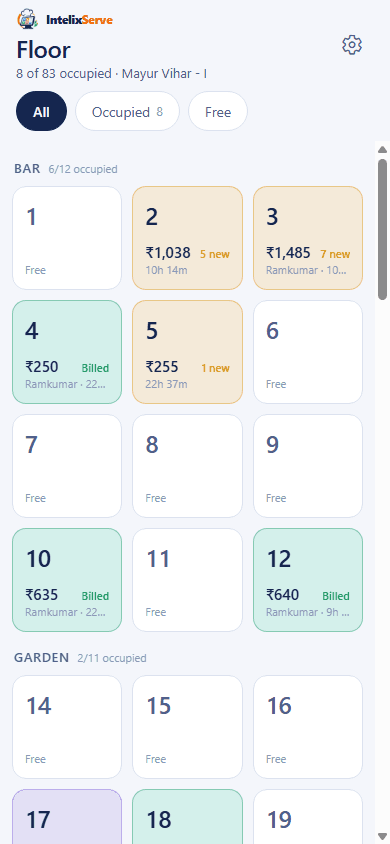
Live floor
Every table by section — occupied, billed, free — with the running amount and who is serving it.
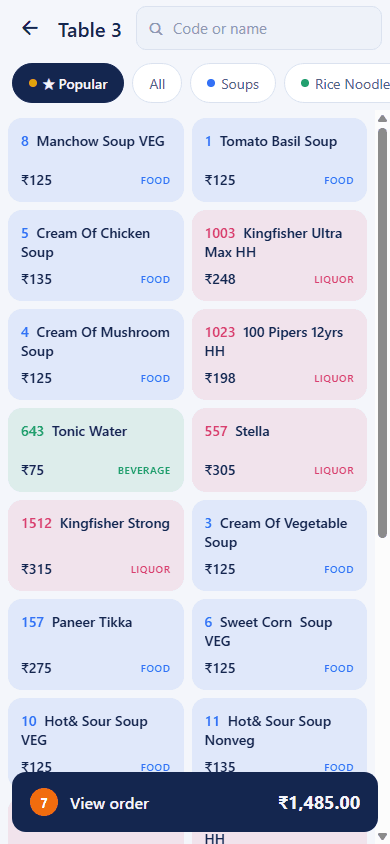
Menu at the table
Popular first, then categories; type a dish code or search. Food, beverage and liquor colour-coded.
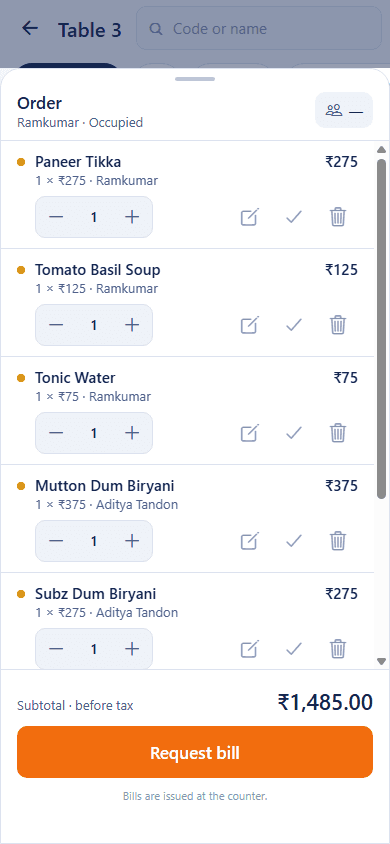
The order sheet
Quantities, notes and voids per line; subtotal live; one tap to request the bill.
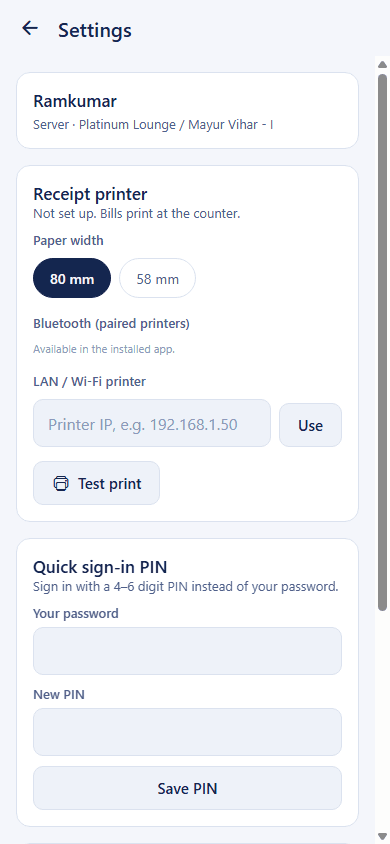
Printer & PIN
Pair a Bluetooth or LAN receipt printer, pick 80 / 58 mm, test print — and set a quick sign-in PIN.
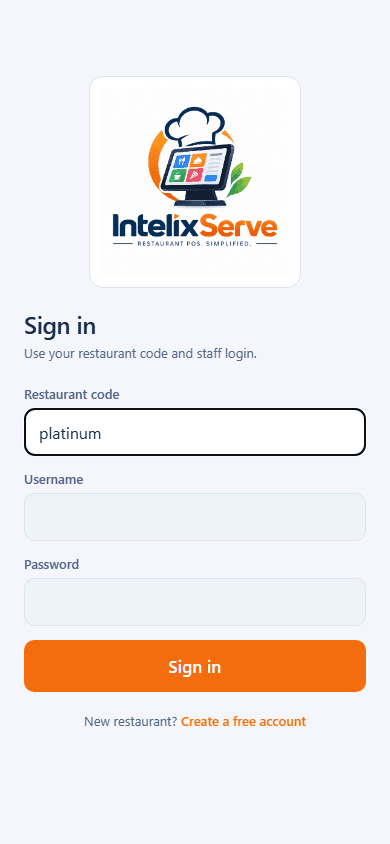
Sign in
Restaurant code and staff login, then a PIN or fingerprint between tables.

Password, PIN or fingerprint
Sign in once with a password, then unlock with a 4–6 digit PIN or biometrics between tables.
Owner switch for the whole restaurant
Turn the phone app off for the whole restaurant from Admin. Phones are refused cleanly with MOBILE_DISABLED.
Also a web PWA
No app store needed — the mobile interface opens at app.intelixserve.com/m on any phone and takes orders and issues bills. Printing from a phone needs the Android app.
One phone per login
Each login works on one phone at a time, so a waiter's login can't be passed around the floor and the orders on a phone belong to the person signed in on it.
Know the day before it ends
Reports your accountant will actually use, scoped by role — cashiers see today, owners see everything.
Sales summary
Totals by date range with bill counts, discounts, service charge and taxes.
Daily report
Cash vs credit, food / beverage / liquor sale, discounts and service charge — the sheet you close the day with.
Department-wise
Per category and item: quantity, tax and amount. Indian and imported liquor split out.
Bill register
Every issued bill by number, with edits and back-dated postings flagged.
Multi-tenant from the ground up
Each restaurant is isolated by tenant — EF Core filters plus SQL Server row-level security on every query.
Menu, staff, tables, settings
Categories, dishes, codes, prices and sold-out toggles. Logins, roles, deactivation and password resets. Sections and table numbers. Restaurant details and GSTIN.
Roles with real permissions
Owner, Manager, Cashier, Waiter, Kitchen — permissions like orders.void, bills.discount and bills.edit travel inside the JWT.
Row-level tenant isolation
Every row carries a TenantId; SESSION_CONTEXT is set on each connection so the database itself enforces the boundary.
Start fresh
Clear every order, bill and payment and restart numbering — keeping menu, tables, staff and settings — with password and restaurant-code confirmation.
Audit-logged support
When you need help, our support signs in with an audited, time-boxed session — never a shared password.
Multi-branch on Pro
On the Pro plan, run up to three branches; each has its own bill series, settings, tables and receipt printer.
Run the restaurant from wherever you are
Cloud-hosted, so the owner, the counter, the waiters and even the guests all work on the same live data — from any device, anywhere.
Work from anywhere
The counter and the admin are web apps; the owner can watch the floor, issue bills and read the day's reports from home or a phone — same live data, no VPN.
Billing through the mobile app
Waiters issue the bill, take cash, card or UPI, and print the receipt over Bluetooth — all from the phone at the table, without walking to the counter.
Broadband down? Bill from the phone
When the restaurant's broadband or Wi-Fi drops, phones carry on over 4G or 5G on the same live floor and print to a Bluetooth printer. The counter picks up when broadband is back; nothing is re-entered.
Guests order by scanning the table QR
Each table gets a QR code. Guests scan it, browse the menu on their own phone and place the order — it goes straight onto that table's running order for the kitchen and the counter.
All data saved on the cloud
Every order, bill and payment is stored in the cloud and backed up — nothing lives on a counter PC that can crash, and every device sees the same numbers.
Your floor could be live by tonight's service.
Create your restaurant, add your menu, hand phones to the waiters. We help with menu migration and printer setup on every plan.